Draw on Liquidity · TradingView
Know where price wants to go.
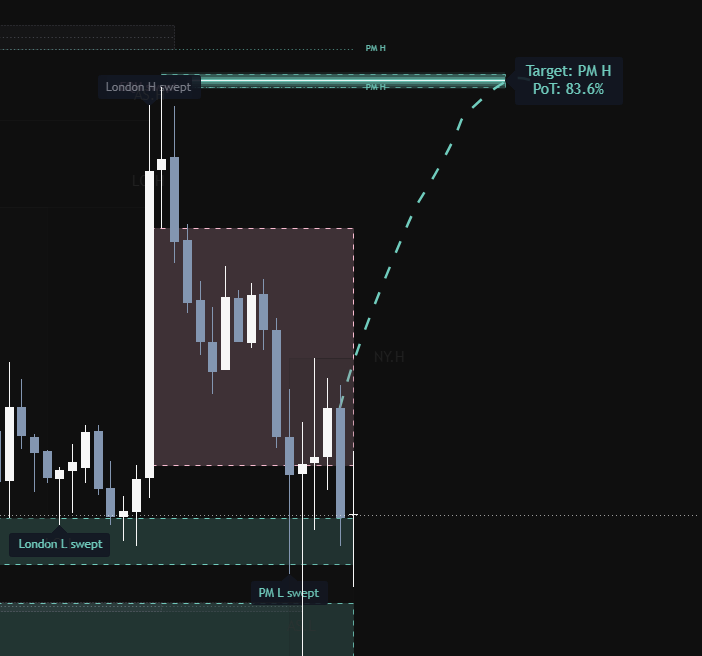
DOM scans liquidity across sessions and timeframes, then shows you the next most likely target — with a probability of touch.
Limited-time sale · Lifetime access · One payment
What it does on your chart
Main & secondary target
Picks the most likely liquidity pool price is heading to and draws a clear path to it.
Probability of touch
Every target gets a PoT % based on current volatility and your time horizon.
Sweep tracking
Marks when session highs/lows get swept and judges if the sweep was rejected or accepted.
Key levels built in
Previous day & week highs/lows, Asia, London, pre-market and New York sessions, EQH/EQL.
Multi-timeframe bias
Swing, Day Trading and Scalping modes align three timeframes so the bias stays consistent.
FVG, OB & volume profile
Fair value gaps, order blocks and previous-day POC / value area feed into target scoring.
Example
See it in a real move
Sweeps
Rejected or accepted?
When price takes out a key level — like London high, PDH or pre-market low — DOM remembers it and watches what happens next. Each sweep gets one of three verdicts.
Watching
The level was just taken. No decision yet — this is not the moment to enter.
Rejected
Price wicked through and closed back inside. A liquidity grab. A rejected high sweep turns the bias bearish; a rejected low sweep turns it bullish.
Accepted
Price broke the level and held beyond it. A real break. The bias follows the break direction toward the next target.
Playbook
How to enter a trade with DOM
Check the bias
Look at the dashboard. The bias from your three timeframes tells you which direction to favour. Trade with it, not against it.
Find the target
The main target (with its PoT %) shows where price is most likely drawn to. A higher PoT means the target is more likely to be reached in your time window.
Wait for a sweep verdict
Don't chase. Let price sweep a nearby level, then wait for the indicator to judge it as rejected or accepted.
Enter with your own confirmation
Use your own entry model — a market structure shift, an FVG or order block retest — in the direction of the target.
Manage the trade
Place your stop beyond the sweep wick. Take partials at the main target, and let the rest run toward the secondary target.
Example only, not financial advice. Always use your own confirmation and risk management.
Questions & answers
Set it up your way
For the best results, put in your own settings: choose your trading mode, set your session hours and timezone, and tune target distance and scoring to the market you trade. Every option is adjustable in the indicator settings.
It's a helper, not a guarantee
No indicator is 100% accurate. DOM shows likely targets — you still need a good entry, your own confirmation and proper risk management. Use it as a tool to support your decisions.
Lifetime access
Loading price…
- One payment, no subscription
- All future updates included
- Works on any TradingView market
- Swing, Day Trading & Scalping modes